GlucoGlow
A mobile and smartwatch experience concept supporting diabetes management through glucose monitoring, alerts, and accessible data visualization.
Platforms
iPhone app · Home-screen widget · Smartwatch
Approach
Personas & scenarios · Moderated usability testing · Iterative prototyping
01
Glucose data, without the manual scan
Monitoring blood glucose several times a day is essential, yet many conventional methods still require people to manually scan their CGM device with a separate reader. That manual step leads to missed readings, data errors, processing delays, and no reliable way to track immediate glucose fluctuations - a particular challenge for people with Type 1 diabetes.
GlucoGlow is a health-focused mobile and smartwatch application for daily diabetes management. It integrates with a Continuous Glucose Monitor (CGM) smart reader add-on that continuously syncs live blood sugar data to the user's phone or smartwatch via Bluetooth.
02
Designed for patients and caregivers
Two personas, with a scenario for each, guided the design.
PERSONA 1 - LIVING WITH TYPE 1 DIABETES
Sara
Her CGM requires manual scans, which leads to missed check-ins during a busy schedule. She needs something reliable during long meetings, workouts, and overnight.
PERSONA 2 - CAREGIVER
Ben
His wife was recently diagnosed with Type 2 diabetes. He wants to support her and stay informed without being overbearing or overwhelmed by complex data.
What users expected
- Fast, accurate, real-time readings without disrupting daily routines
- Accurate, timely, and actionable hypo/hyperglycemia alerts
- Simple, visual data with graphs and trends that are easy to interpret
- Clear guidance on what to do next, without guesswork
03
Design approach
These needs translated into four core design goals, carried across an iPhone app, a home-screen widget, and a smartwatch view.
GOAL
Streamlined live glucose readings
GOAL
Instant alerts for hypo- or hyperglycemia events
GOAL
Detailed graphs of historical data
GOAL
Data sharing with caregivers and healthcare providers
The prototype brought these together in four key features: real-time glucose monitoring, hypo/hyper alert notifications, meal and insulin dose logging for personalized recommendations, and a smartwatch interface. Those same features became the focus of usability testing.
04
Usability Testing
A moderated think-aloud usability test evaluated the mobile and smartwatch prototype in Figma, both in person and over Zoom. Five participants - people living with diabetes and caregivers - completed four tasks, then answered questions about ease of use, confidence, and suggestions for improvement.
- Task 1Real-time glucose monitoring
- Task 2Alert handling
- Task 3Log a meal and insulin dose
- Task 4Smartwatch quick view
What worked
- Clear real-time readings - Color indicators and live readings helped users see whether they were in a healthy range.
- Easy-to-understand alerts, especially helpful when busy with other tasks.
- Smartwatch and widget quick views for checking levels without opening the app.
- Simple visual design - Clear graphs and trend arrows communicated changes better than text alone.
What needed work
- Unlabeled icons made it hard to navigate and to log meals and insulin.
- Inconsistent search-bar placement left users hesitant about the next step.
- Small text was difficult for some users to read.
05
Key refinements
Each refinement below responds directly to a finding from testing, following the product from glucose monitoring to alerts, journaling, and the smartwatch.
REFINEMENT 1 · GLUCOSE MONITORING
Clearer navigation
From testing: unlabeled icons made it hard to navigate and to log meals and insulin.
Navigation icons gained text labels, the unclear carrot icon became a fork and knife, and "Food log" was renamed "Journal Log".
REFINEMENT 2 · ALERTS & NOTIFICATIONS
Plain-language alerts
From testing: participants preferred less metric-based suggestions during an emergency.
The low-glucose alert's wording replaced numerical units with everyday items: treat with juice, glucose tablets, or another sugar source, and recheck in 15 minutes.
REFINEMENT 3 · SMARTWATCH
Smartwatch Experience
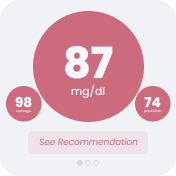
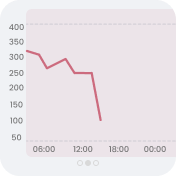
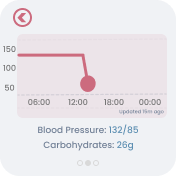
From testing: the smartwatch interface was clear and intuitive, but its recommendations raised concerns.
The recommendations were changed, an additional screen was added, health metrics were removed from the main graph footer, and a tap option now opens a magnified graph line.
06
The finished experience
The completed interface, from checking glucose at a glance to logging meals and insulin.
01 · GLUCOSE MONITORING
In range, at a glance
The home-screen widget shows the live reading, its status, and the trend without opening the app, alongside the dashboard shown in Refinement 1.
02 · ALERTS & NOTIFICATIONS
Going low
When glucose drops, the widget flags the low reading and its downward trend, while the app shows the alert from Refinement 2.
03 · JOURNALING & TRACKING
Meals and insulin dosage
Meals are logged in the Journal Log. Users can log their meals and view insulin dosage recommendations to support diabetes management. The journal displays meal information alongside insulin dosage details.
Insulin dosage recorded
07
What's next
Usability testing validated GlucoGlow's core design as an easy and helpful tool. Real-time data via the widget and smartwatch, and immediate safety alerts, achieved high confidence and satisfaction, while iteration addressed icon ambiguity and inconsistent UI through clearer labels and standardized placement.
Future directions
- Work with pre-existing CGM devices, as a third-party option for users whose CGM depends on their insurance provider
- Explore CGM calibration and adjustments to insulin injections in future testing
- Design for users who change the brand of their CGM device
Related Research
Wearable Technology & Diabetes
A literature review exploring how wearable technology, glucose monitoring, and interactive health systems influence diabetes self-management, everyday habits, and decision-making.